NativeJ 5.2.6
Updated on 23 Feb 2012
By Anthony Buckner
By Anthony Buckner
Specifications
License:
Shareware (Free to try)
Updated:
Downloads:
1355
Platform:
Windows (All Versions)
Publisher:
DobySoft(more)
Website:
User Reviews:
Other versions:
5.2.5, 4.8.6, 4.8.3
Do you like
NativeJ?
NativeJ?
FindMySoft Editor's Review
NativeJ - Java EXE / Executable Maker
Nowadays, Java is used everywhere, in mobile devices, in media players, in cars and of course, in computer world. Java applications generally have the JAR extension. Running these files requires Java Runtime Environment to be installed on the computer where the java application is run. What if you could turn that JAR file into a regular Windows executable? This way, JRE won't be required and, at the same time, the created EXE will behave like a native Windows application. A software that can do just this is NativeJ. Judging by its name, the program can turn JAR files into native applications.
The software is simple to install and supports the Windows operating system, with all its versions. The installation process of NativeJ is extremely simple and requires little intervention from the user.
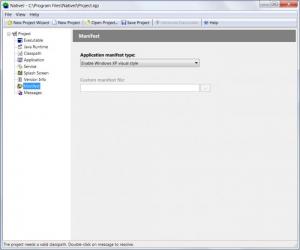
The interface of NativeJ is wizard based and allows any type of user to take advantage of it. Basically, one just has to select the desired JAR file, set the name of the executable and that's it. Advanced users can fine-tune this process and can configure a lot of options for turning java files into EXE.
Project settings can be saved to be reused later.
Pros:
It features a simple step by step wizard for quickly converting java into executable files. Besides that, advanced users have a lot of settings for customizing the conversion process.
Cons:
The program requires some knowledge regarding JAR files, so beginners might have some trouble using the software.
NativeJ is a powerful solution for turning any JAR application into native Windows applications.
The software is simple to install and supports the Windows operating system, with all its versions. The installation process of NativeJ is extremely simple and requires little intervention from the user.
The interface of NativeJ is wizard based and allows any type of user to take advantage of it. Basically, one just has to select the desired JAR file, set the name of the executable and that's it. Advanced users can fine-tune this process and can configure a lot of options for turning java files into EXE.
Project settings can be saved to be reused later.
Pros:
It features a simple step by step wizard for quickly converting java into executable files. Besides that, advanced users have a lot of settings for customizing the conversion process.
Cons:
The program requires some knowledge regarding JAR files, so beginners might have some trouble using the software.
NativeJ is a powerful solution for turning any JAR application into native Windows applications.
System Requirements
Executables generated by NativeJ will run on all versions of Microsoft Windows, including Windows 9x/ME.
Java Runtime Environment (JRE) 1.2 and above.
Do you like NativeJ
Quick Look VideoNew
Popular News
The soon to be released Samsung Galaxy S3 is shaping up to be an event bigger commercial success than its predecessor, the Samsung Galaxy S2
Linux fans once again have the chance to take part in the annual Linux Foundation T-Shirt Design Contest, now in its 3rd edition
NativeJ Awards
NativeJ Editor's Review Rating
NativeJ has been reviewed by Jerome Johnston on
23 Feb 2012. Based on the user interface, features and complexity, Findmysoft has rated
NativeJ
4
out of 5 stars, naming it ExcellentYour Rating
Top Downloads
2.
Opera5.
Trillian8.
AIM9.
Skype10.
Ad-Aware12.
Nero13.
Google Earth14.
Picasa15.
Winamp16.
iTunes17.
RealPlayer18.
uTorrent19.
eMule20.
WinRAR21.
BitComet22.
WinZip23.
Shareaza24.
CCleaner25.
Recuva26.
Tweak UI27.
CuteFTP Home29.
Adobe Reader30.
NewsPiperBecome A Fan!
Link To Us!
NativeJ
HTML Linking Code
HTML Linking Code
Latest Reviews